Namecheap Config
The Namecheap Config section allows you to manage Namecheap settings for your application. This feature is designed to help you optimize domain registration and management by configuring various Namecheap options, ensuring your domains are efficiently managed and secured.
Namecheap Configuration
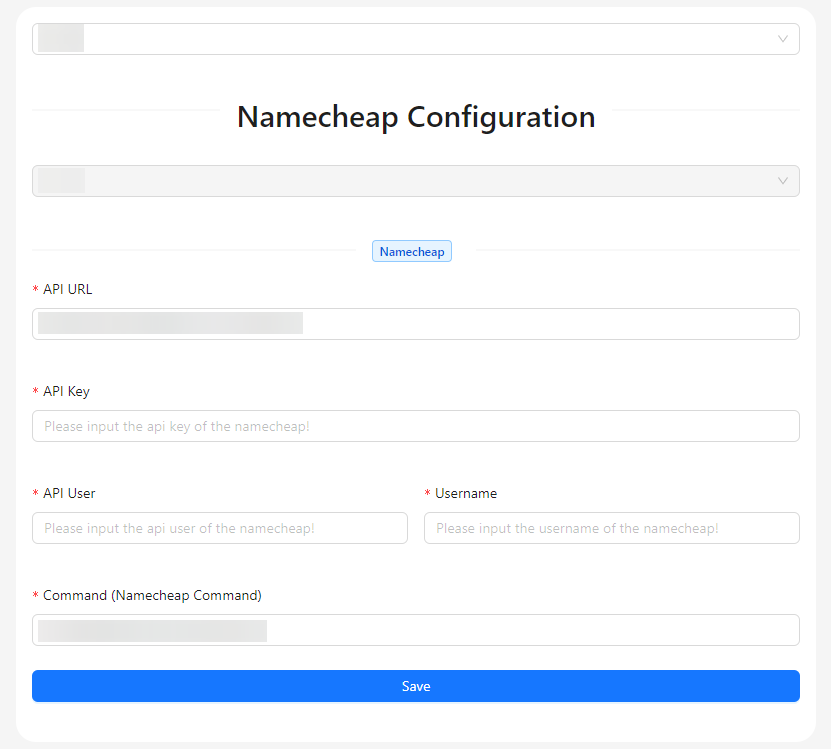
- Sites: Select the site for which you want to configure Namecheap settings.
- Set Custom DNS: This button allows you to set the custom DNS for Namecheap. It will appear once the Namecheap configuration has been completed. 🔗
- Sites: This field displays the selected site and is disabled to prevent changes.
- API URL: Enter the Namecheap API URL to enable integration with Namecheap services.
- API Key: Provide your Namecheap API key for authentication purposes.
- API User: Input the username associated with your Namecheap account.
- Username: Enter your Namecheap account ID to link the configuration to your specific account.
- Command (Namecheap Command): Specify the Namecheap command to be executed.
- Save: Click this button to save the Namecheap configuration settings.