Create Sub Agent
The Create Sub Agent section allows you to add sub agent.
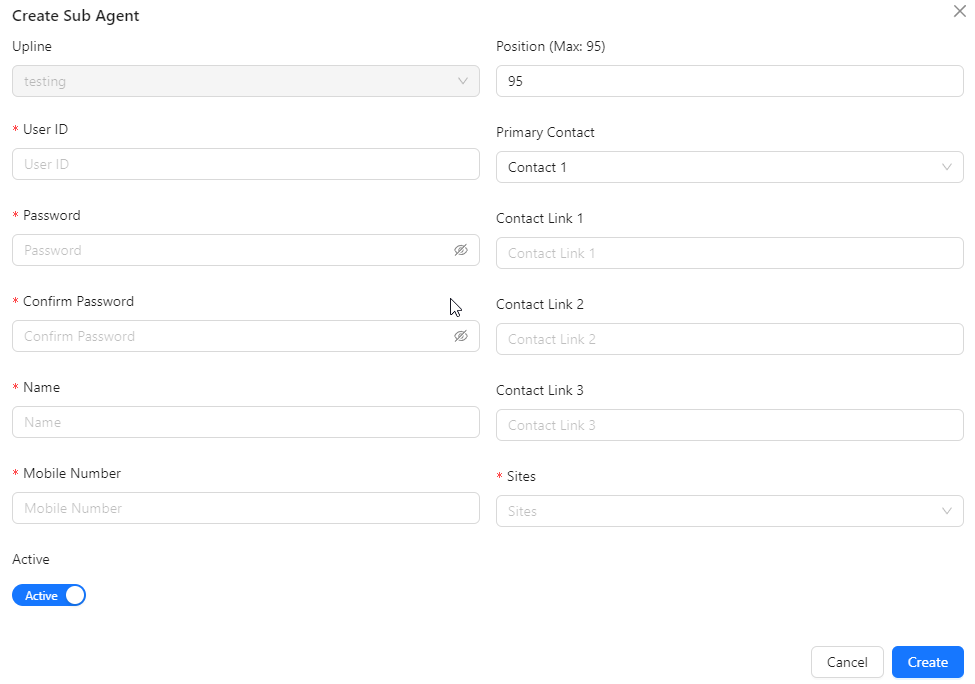
- Upline: Automatically assigned based on the selected agent from the listing.
- User ID: The unique identifier for the sub-agent within the system.
- Password: The password used for the sub-agent's account.
- Confirm Password: Re-enter the password to confirm it matches the initial entry.
- Name: The full name of the sub-agent.
- Mobile Number: The contact phone number for the sub-agent.
- Active: Indicates whether the sub-agent's account is currently active or inactive.
- Position (Max: 95): The profit percentage associated with the sub-agent's role, with a maximum value of 95%.
- Primary Contact: The primary contact person or method for the sub-agent.
- Contact Link 1: The first additional contact link for the sub-agent.
- Contact Link 2: The second additional contact link for the sub-agent.
- Contact Link 3: The third additional contact link for the sub-agent.
- Sites: The locations or platforms associated with the sub-agent's activities.