View Product Message
The View Product Message section provides detailed information on API interactions for the product. Here, you can review and manage product-related messages, including the API URL, status code, message type, payload, and response. This section helps in troubleshooting and configuring product integrations and interactions.
Toolbar

- Date Picker: Allows users to filter product message listing by date.
- Product: Allows users to filter product message listing by product.
Product Message Listing
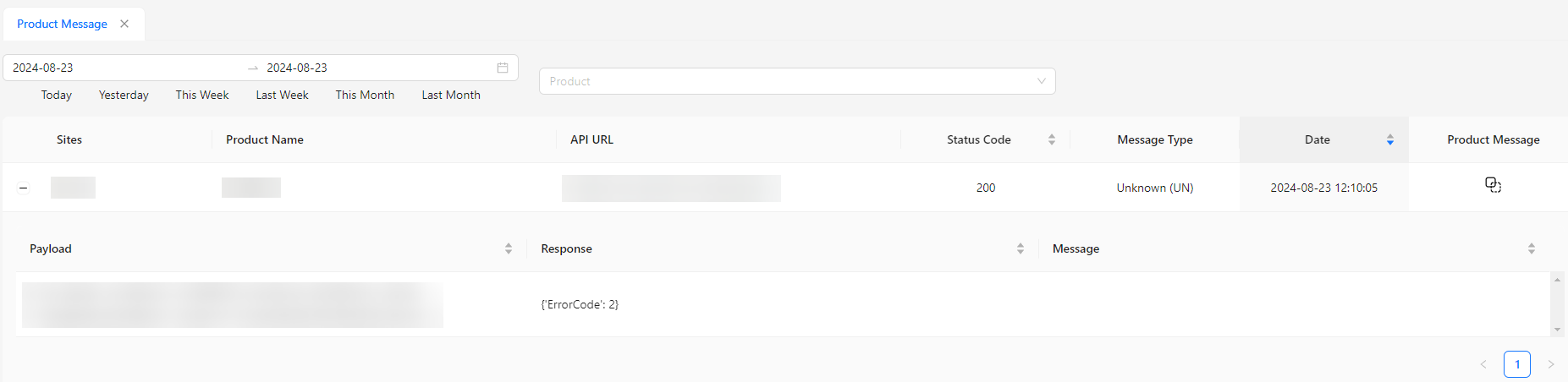
- Sites: The specific site associated with the product message.
- Product Name: The name of the product related to the message.
- API URL: The endpoint used for the API request.
- Status Code: The HTTP status code returned by the API.
- Message Type: The type of message (e.g., request, response).
- Date: The date when the message was recorded.
- Product Message: The main content of the product message. Includes a Copy button to copy the content to the clipboard.
Expandable Table
The table includes expandable sections for:
- Payload: Details of the data sent in the API request.
- Response: The data returned by the API.
- Message: Any additional messages or notes related to the API interaction.