View Mission
The View Mission section provides an overview of all mission created.
Toolbar

- Search: Allow to search for related mission to quickly locate specific mission information.
- Active: Display the status of mission, showing which ones are currently active or inactive.
- Create: Create a new new mission. 🔗
Listing
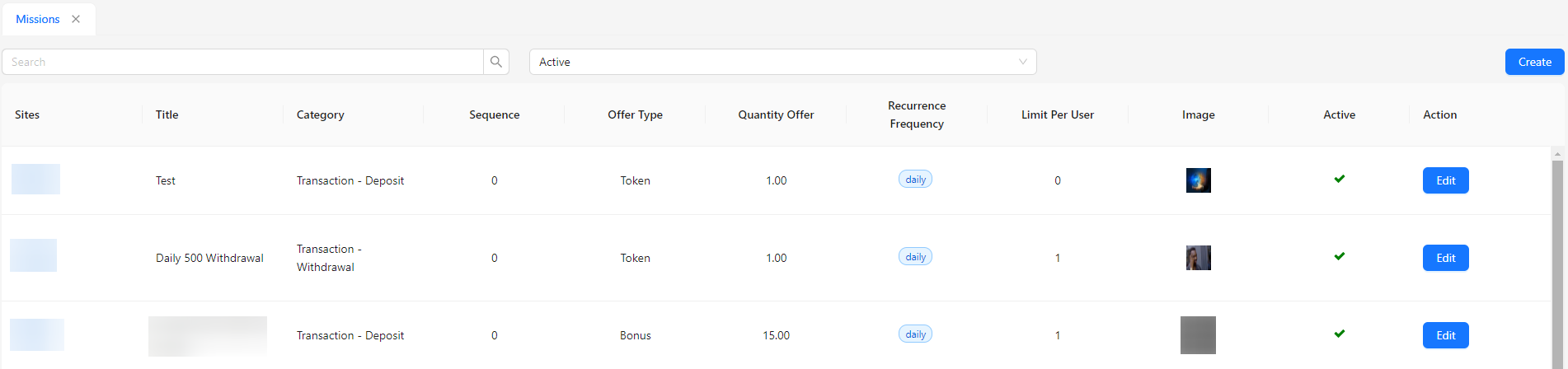
- Sites: Displays the site associated with the mission.
- Title: Shows the title of the mission.
- Category: Indicates the category under which the mission is classified.
- Sequence: Displays the order in which the mission is listed.
- Offer Type: Indicates whether the mission offers tokens or bonuses.
- Quantity Offer: The amount of tokens or bonuses offered as a reward.
- Recurrence Frequency: Shows how often the mission can be completed (daily, weekly, or monthly).
- Limit Per User: The maximum number of times a user can complete the mission.
- Image: Displays the image associated with the mission.
- Active: Indicates whether the mission is currently active.
- Action: Provides options to edit the mission.