Create / Edit Product
The Create / Edit Product section allows you to add and edit product entries to the system.
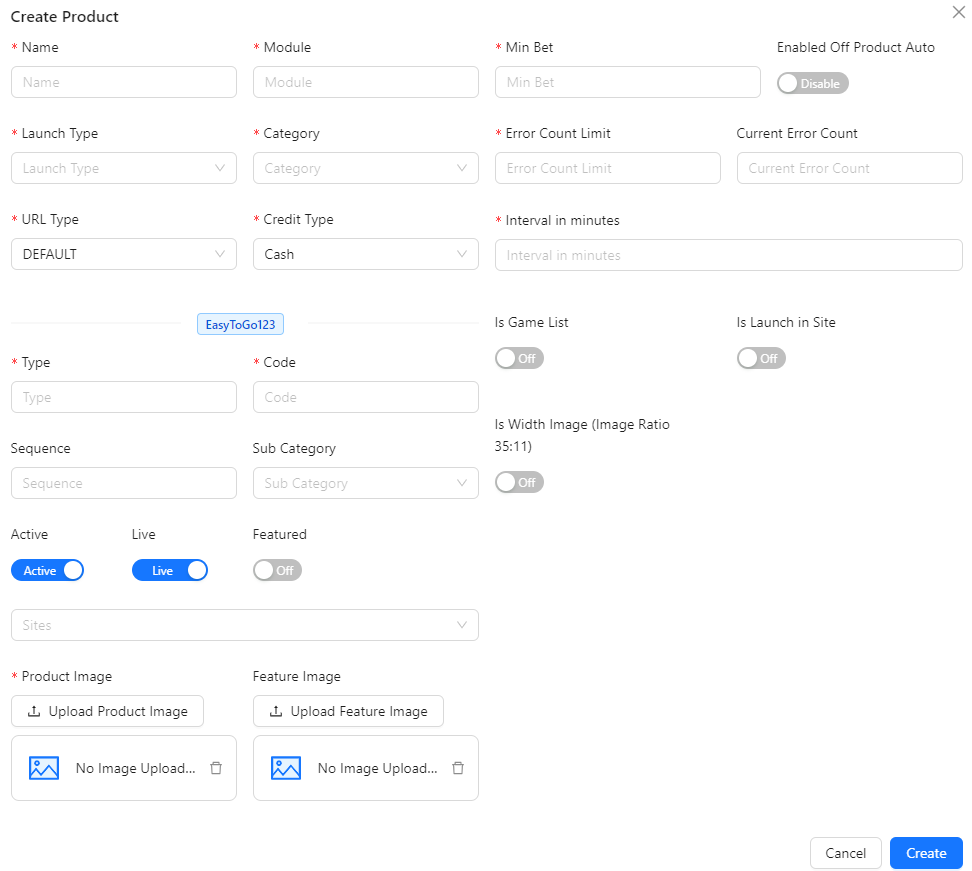
- Name: Enter the name of the product.
- Module: Specify the module or section where the product will be used.
- Launch Type: Select the product launch type. Options include All, App, and H5.
- Category: Choose the category for the product. Options include Card, Casino, CockFight, eSports, Fishing, Lotto, Poker, Slots, Sportsbook, Crash, and Hot Games List.
- URL Type: Specify the type of URL associated with the product. Options include DEFAULT (default selected), EZTECH88, and DIRECT (Product Category).
- Credit Type: Select the type of credit associated with the product. Options include Chips, Cash (default selected), and Cash & Chips.
- Type: Specify the type of the product.
- Code: Enter a unique product code.
- Sequence: Define the sequence or order of the product in the listing.
- Sub Category: Select a subcategory for the product. Options include Event Games and Hot Games.
- Active: Determine if the product is active (default: true).
- Live: Indicate whether the product is live (default: true).
- Featured: Mark the product as featured (default: false).
- Sites: Specify the site or platform where the product is available.
- Product Image: Upload the main image for the product.
- Feature Image: Upload an additional feature image for the product.
- Min Bet: Specify the minimum bet amount for the product.
- Enabled Off Product Auto: Enable automatic disabling of the product based on error count limits and intervals (default: false). The product will turn off if the error count exceeds the specified limit within the defined interval.
- Error Count Limit: Set the maximum number of errors allowed before the product is automatically turned off.
- Current Error Count: Automatically displays the current error count for the product.
- Interval in Minutes: Set the time interval (in minutes) within which the error count is monitored. If the error count exceeds the limit within this interval, the product will automatically turn off.
- Is Game List: Indicate whether the product is included in the game list (default: false).
- Is Launch in Site: Specify if the product is launched in the site (default: false).
- Is Width Image (Image Ratio 35:11): Indicate if the product image should use a specific ratio (default: false).