View Product
The View Product section provides an overview of all product-related information within the system. It displays details about each product, including product names, descriptions, prices, and availability, allowing you to efficiently manage and review your product inventory.
Toolbar

- Search: Allow to search for related product names to quickly locate specific product information.
- Active: Display the status of banks, showing which ones are currently active or inactive.
- Live: Filter the product listing to show only products that are currently live or not live.
- Category: Filter the product listing based on product categories.
- Launch Type: Filter the product listing based on the product launch type.
- Create: Create a new product. 🔗
Listing
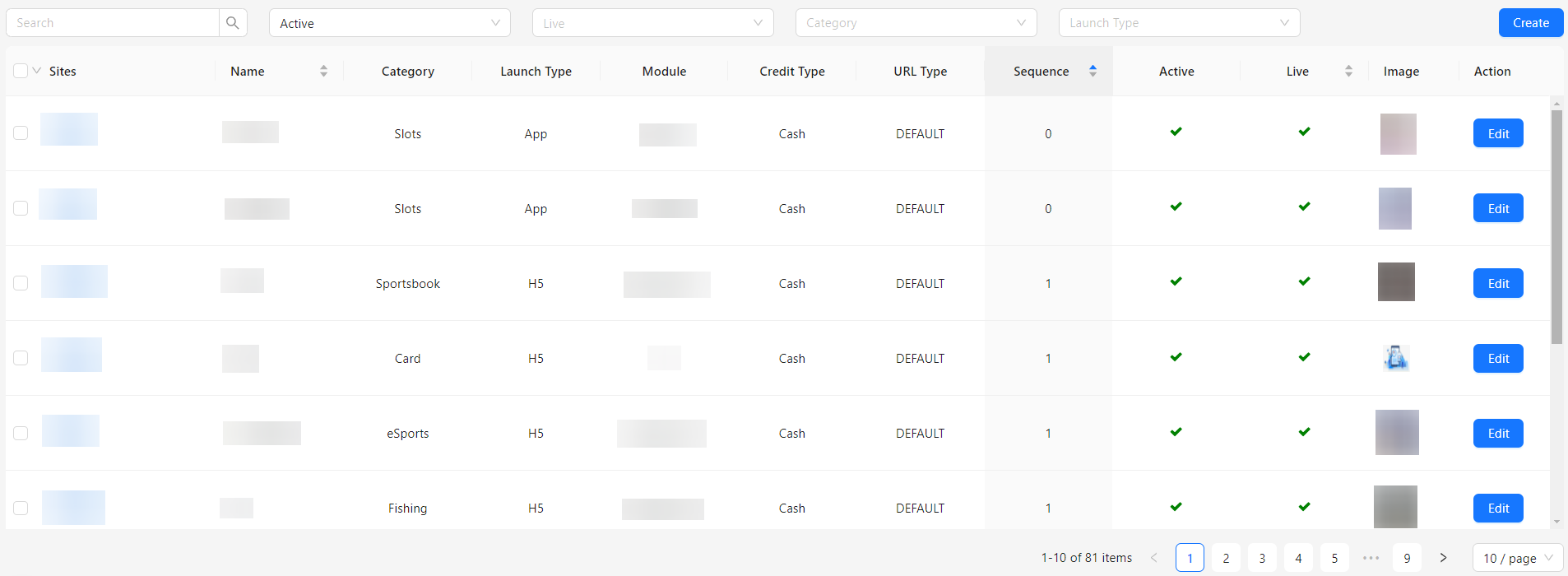
- Sites: Displays the site or platform where the product is available.
- Name: Shows the name of the product.
- Category: Indicates the category to which the product belongs.
- Launch Type: Specifies the type of product launch.
- Module: Displays the module or section of the application where the product is used.
- Credit Type: Indicates the type of credit associated with the product, if applicable.
- URL Type: Shows the type of URL or link associated with the product.
- Sequence: Displays the order or sequence of the product in the listing.
- Active: Indicates whether the product is active or inactive.
- Live: Shows whether the product is currently live or not live.
- Image: Displays the product image.
- Action: Provides options for users to edit or manage the product.