View Ranking
The View Ranking section allows you to manage and configure ranking settings for your application. This feature is designed to help you efficiently organize and manage rankings, including adding new rankings and editing existing ones in inline edit mode.
Toolbar

- Search: Allow to search for related ranking to quickly locate specific ranking information.
View Ranking
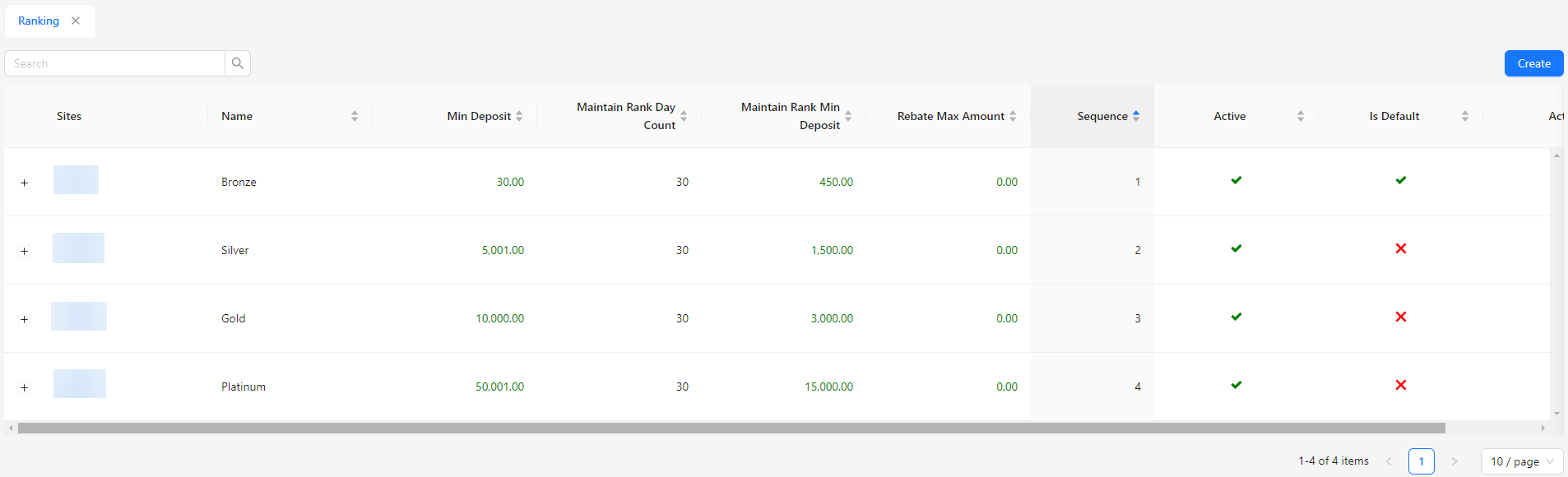
- Sites: Displays the site associated with the ranking.
- Name: Shows the name of the ranking.
- Min Deposit: Indicates the minimum deposit required to achieve or maintain the ranking.
- Maintain Rank Day Count: Specifies the number of days required to maintain the ranking.
- Maintain Rank Min Deposit: Indicates the minimum deposit needed during the maintenance period to retain the ranking.
- Rebate Max Amount: Displays the maximum rebate amount allowed for this ranking.
- Sequence: Shows the sequence or order in which the ranking appears.
- Active: Indicates whether the ranking is currently active or inactive.
- Is Default: Specifies if this ranking is set as the default ranking.
- Action: Provides options to edit or manage the ranking settings.